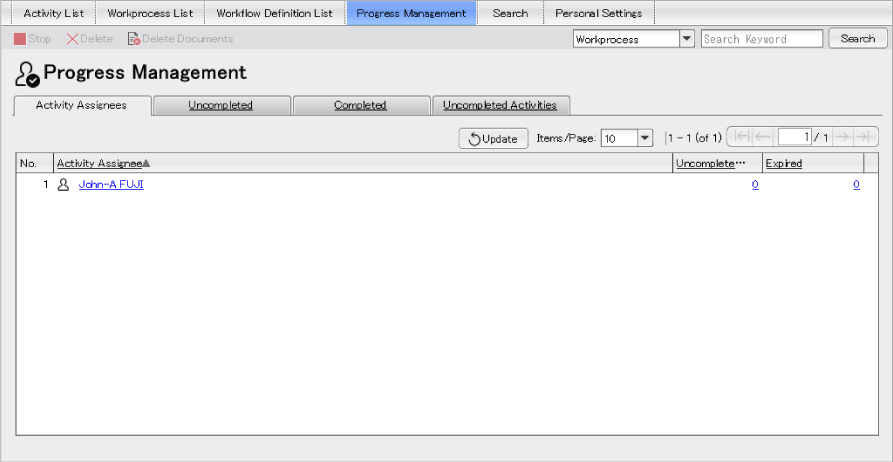
The [Activity Assignees] page lists the number of activities assigned to your Progress Managed.
The Progress Managed can be set in the [Progress Managed Settings] page of the [Personal Settings] window.
For details on how to set the target users. ➯ "Setting Progress Managed"
Fig.: [Activity Assignees] page
While Collabo service is not operating, a message to the effect that Collabo service is currently unavailable appears.
The following explains each item of the [Activity Assignees] page.
| Item | Description |
|---|---|
| [No.] | Displays the sequence number in the list. |
| Displaying attributes | The attributes of the Workflow definitions or start templates set in the view options are shown. If the list is sorted by any attribute,  (sort in ascending order) or (sort in ascending order) or  (sort in descending order) is shown. Clicking the attribute name sorts the items by that attribute in ascending order and shows on the right of that attribute name. (sort in descending order) is shown. Clicking the attribute name sorts the items by that attribute in ascending order and shows on the right of that attribute name.[Activity Assignees] Displays the name of the user to be referred to. [Uncompleted] Displays the number of uncompleted activities that is assigned to the user. Clicking displays a page equivalent to the [Assigned] page for the user. The page does not have the upper frame ([Switch Workflow Operation Window] area) but has the [Close] button. [Expired] Displays the number of the activities the close date of which has expired from among the activities assigned to the user. Clicking displays a page equivalent to the [Assigned] page for the user. The page does not have the upper frame ([Switch Workflow Operation Window] area) but has the [Close] button. |